Sendouts - activity report
The Activity Report provides all the information on the interactions that recipients have had with the message sent.
Here is the information available:
- Subject, message ID, tags associated (if present)
- The total number of recipients
- The total number of delivered emails and the delivery rate
- Bounces
Let's do a rundown of which metrics are available for thew sendout.
Opens
- Unique open rate for the message, calculated over delivered emails
- Opens are the sum of all unique opens registered
- Total opens are the sum of every open activity by the message recipients
- Segment opens is a link to a page where you can get open data sorted by recipient filters
Clicks
- Unique click through rate for the message, calculated over delivered emails
- Clicks are the sum of all unique opens registered.
- Total clicks are the sum of every click activity by the message recipients
- Segment clicks is a link to a page where you can get click data sorted by recipient filters
Unsubscription
- Unsubscription rate for the message, calculated over delivered emails
- Unsubscriptions click on the unsubscription link
- Abuse complaints are a specific unsubscription type, which happens when a recipient reports a spam abuse to the email provider. For more info, read Types of bounces.
- Total shares are the sum of clicks on the special links "Social share" and "Send to a friend"
The last part of the Activity report contains:
- Open and click trends, with a default period of 10 days from the last mailing. The period can be changed to the last 10/30/90 days or to a custom period.
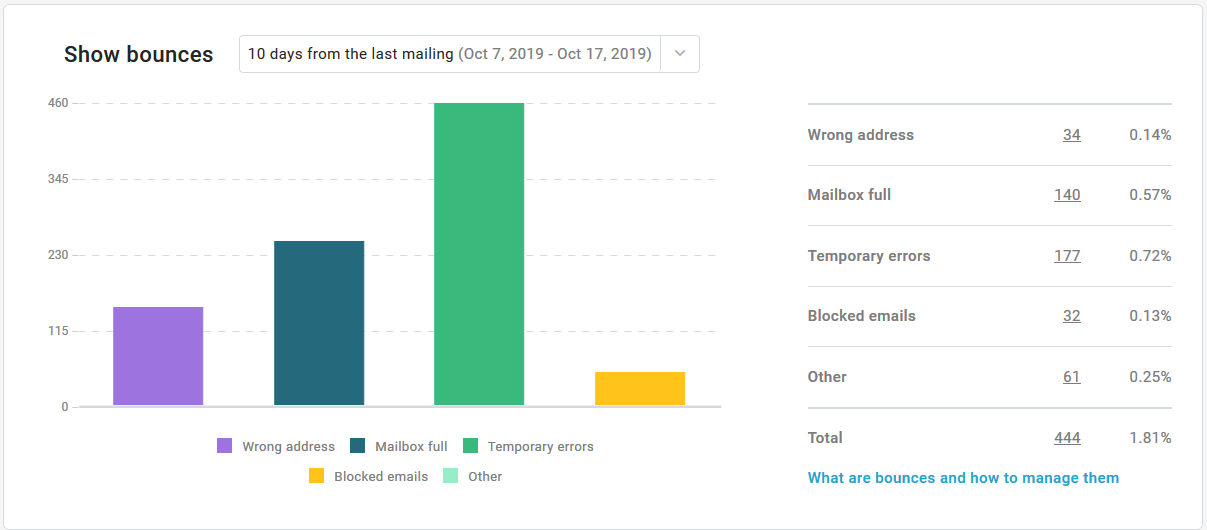
- Bounces graph, with a default period of 10 days from the last mailing. The period can be changed to the whole period from the first mailing or to the last 10/30/90 days or to a custom period. This section also includes the number of bounce occurences and their rate over the email delivered in the selected time period.
- Filters and groups selected for the last mailing
- Details on the sender used for the last mailing
, multiple selections available,